
IPTV Canada: Get IPTV Subscription From $5/Month
Looking for an affordable IPTV Canada subscription? With MajorPanel, you can create a free account, add funds by card or crypto, select your IPTV Canada plan, enter your username, place your order, and receive your IPTV account by email.
What Is IPTV Canada?
IPTV Canada is a modern way to watch TV channels, movies, sports, and entertainment through an internet connection instead of traditional cable. Many Canadian viewers search for IPTV because they want a flexible, affordable, and easy-to-use subscription that works on devices like Firestick, Android TV, Smart TV, phone, tablet, and PC.
If you are looking for a simple way to start, MajorPanel makes the process easy. You create your account, add funds, choose your preferred IPTV Canada subscription, place the order, and receive your IPTV account details by email.
Affordable IPTV Canada option
Start with a low-cost IPTV Canada subscription and choose the plan that matches your needs. This is a good option for users who want an affordable IPTV Canada service without paying expensive cable prices.
Why Choose MajorPanel for IPTV Canada?
When people search for the best IPTV Canada, they usually want three things: affordable pricing, simple setup, and fast access. MajorPanel is built to make the buying process easier, especially for users who want a quick IPTV subscription without complicated steps.
Low Monthly Cost
Start from $5/month and choose the IPTV Canada plan that fits your budget.
Easy Account Setup
Create your account with email or continue with Google in a few seconds.
Flexible Payments
Add funds using card, Apple Pay, Google Pay, or crypto when available.
- ✅ Simple dashboard to order IPTV subscriptions
- ✅ Fast add-funds process
- ✅ Multiple IPTV Canada subscription options
- ✅ Works with common IPTV players and devices
- ✅ Good option for users who want a budget IPTV Canada service
- ✅ Account details delivered by email after order processing
How to Get IPTV Canada From $5/Month
Ordering your IPTV Canada subscription is simple. Follow these steps to create your account, add funds, choose IPTV subscriptions, enter your username, and receive your account details by email.
Step 1: Create Your Free Account
Go to MajorPanel.com and create your free account. You can register with your email or use the Continue with Google option for faster signup.
Create your account or continue with Google to start ordering IPTV Canada.
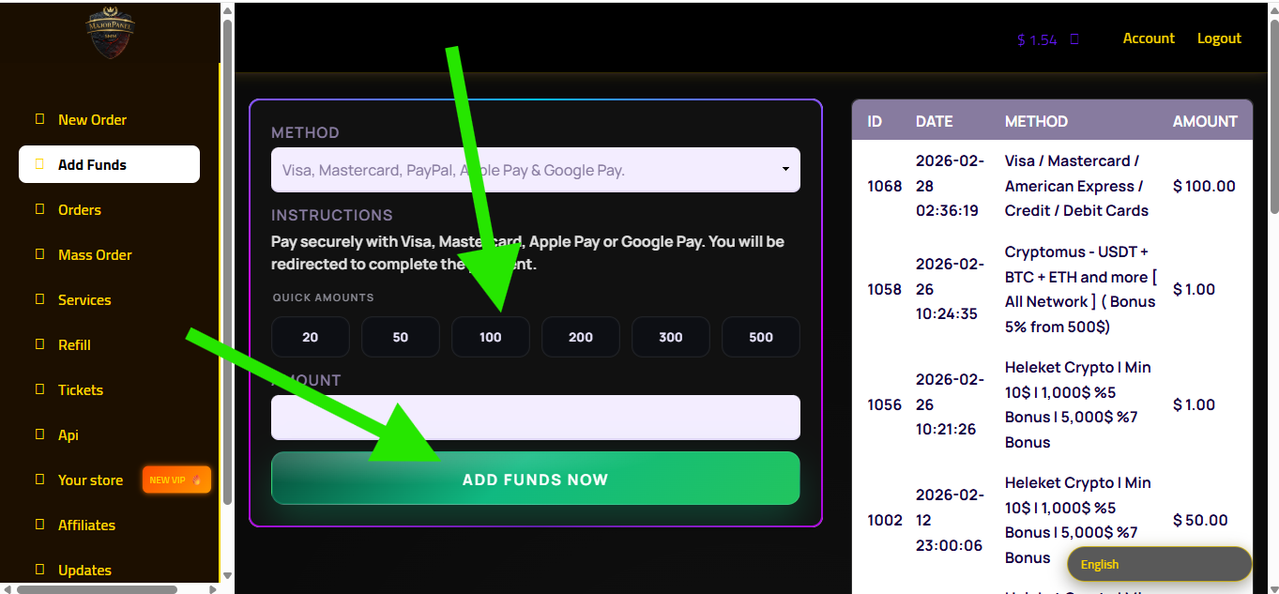
Step 2: Log In and Add Funds
After logging in, click Add Funds. Choose your payment method, enter the amount you want to add, and complete the payment securely.
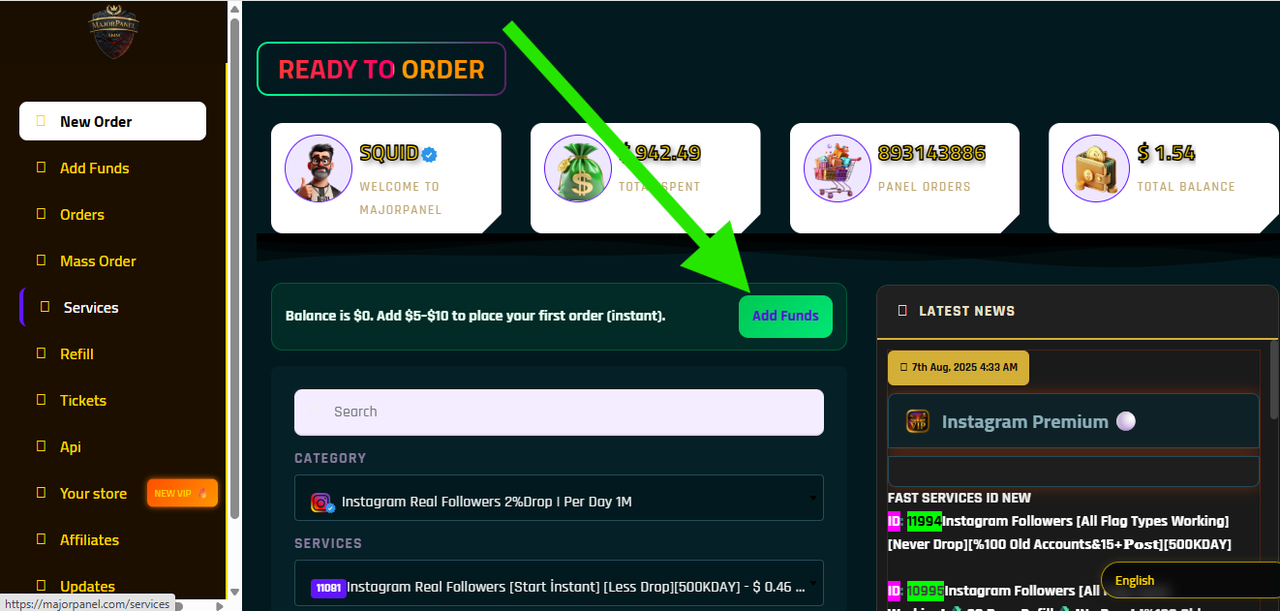
Use the Add Funds page to deposit balance before placing your IPTV Canada order.
Step 3: Pay With Card or Crypto
You can add funds using payment options like Visa, Mastercard, Apple Pay, Google Pay, or crypto depending on what is available in your dashboard. Once the balance is added, you can use it to order your IPTV subscription.
Add Funds With Card or CryptoStep 4: Select the IPTV Subscription
Go to New Order, open the category menu, and choose IPTV Subscriptions. Then select the IPTV Canada plan you want. You can choose monthly or longer subscription options depending on your needs.
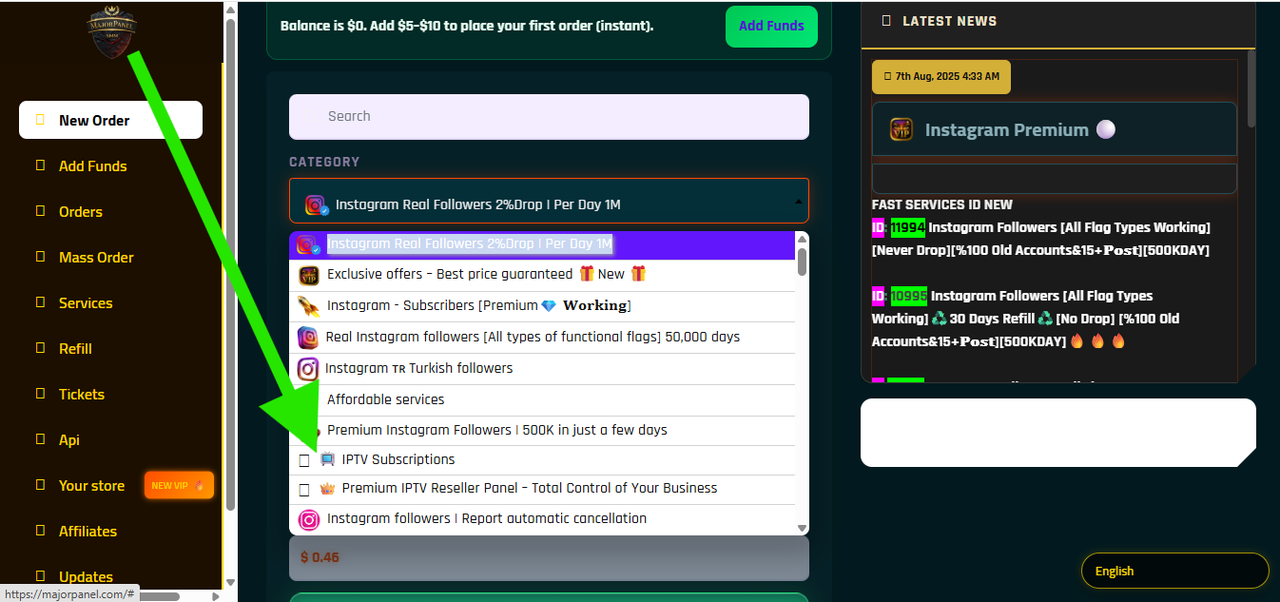
Choose IPTV Subscriptions from the category list and select your preferred IPTV Canada plan.
Step 5: Add Your Username and Click Order
After selecting the IPTV subscription, enter your username or required order details in the form. Then click the Order button to place your IPTV Canada order.
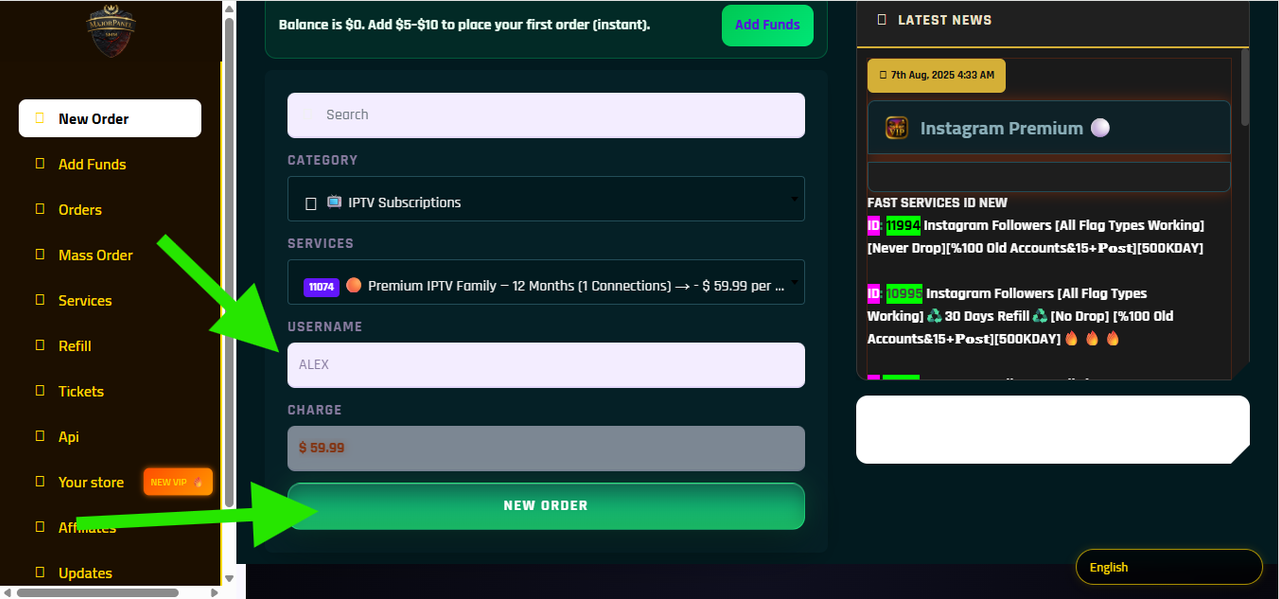
Enter your username, review the order details, and click Order to complete your IPTV Canada request.
Step 6: Receive Your IPTV Account by Email
After your order is processed, you will receive your IPTV account details by email. These details can include the login information you need to activate your IPTV subscription on your preferred IPTV player.
Devices That Work With IPTV Canada
A good Canada IPTV subscription should be easy to use across different devices. After you receive your IPTV details by email, you can usually set them up on popular IPTV apps and devices.
- 📺 Firestick and Fire TV
- 📱 Android phones and tablets
- 📺 Android TV and TV boxes
- 🖥️ Windows PC and Mac
- 📲 iPhone and iPad with compatible IPTV apps
- 📺 Smart TVs using supported IPTV players
Best IPTV Apps to Use
You can use many IPTV players depending on your device. Popular options include IPTV Smarters-style apps, Hot Player, IBO Player, or other IPTV players available in your device’s app store.
How Payment Works
MajorPanel uses a balance system. This means you first add funds to your account, then use your balance to order the IPTV Canada subscription you want.
1. Add Funds
Go to the Add Funds page and enter the amount you want to deposit.
2. Complete Payment
Pay securely with card, Apple Pay, Google Pay, or crypto when available.
3. Place Order
Select your IPTV subscription and complete the order using your balance.
This system is useful because you can keep balance inside your account and order your preferred IPTV plan whenever you are ready.
Best IPTV Canada Subscription for Budget Users
Many people search for cheap IPTV Canada because cable TV can be expensive and limited. With an IPTV subscription, you can choose a more flexible way to watch entertainment online. The most important thing is to use a reliable service, stable internet connection, and a good IPTV player.
MajorPanel is a strong option if you want an affordable IPTV service Canada with a simple order process. Instead of waiting for long manual setup, you can create your account, add funds, select your subscription, enter your username, click order, and receive your account by email.
Who Is This For?
- ✅ Users looking for IPTV Canada from a low monthly price
- ✅ People who want to pay by card or crypto
- ✅ Customers who want a fast and simple IPTV order process
- ✅ Firestick, Android TV, Smart TV, and mobile users
- ✅ Users who want to test an affordable IPTV Canada option before upgrading
Is IPTV Legal in Canada?
IPTV technology itself is legal in Canada when used with properly licensed content. Users should always make sure they follow local laws and choose services responsibly. IPTV players are only tools; the content access depends on the subscription provider and licensing.
IPTV Canada FAQ
How can I buy IPTV Canada from $5 per month?
Create a free account on MajorPanel, add funds to your balance, then choose the IPTV Canada subscription you want from the IPTV Subscriptions category.
How do I order IPTV Canada on MajorPanel?
Create an account or register with Google, log in, add funds, select IPTV Subscriptions, choose your plan, add your username, click Order, and wait to receive your IPTV account details by email.
Can I register with Google?
Yes. You can create an account manually or use the Google registration option for a faster signup process.
Can I pay with card?
Yes. You can add funds using card payment options such as Visa, Mastercard, Apple Pay, or Google Pay when available.
Can I pay with crypto?
Yes. Crypto payment options may be available inside the Add Funds page. Choose the crypto method if you prefer to pay that way.
Will I receive my IPTV account by email?
Yes. After your order is processed, your IPTV account details will be sent to your email. Make sure to check your inbox, spam, or promotions folder.
What devices can I use for IPTV Canada?
You can use IPTV on Firestick, Android TV, Smart TV, Android phone, iPhone, tablet, Windows PC, Mac, and other compatible devices with an IPTV player.
Does IPTV include an app?
IPTV subscriptions usually work through IPTV player apps. You install a compatible player, then enter your subscription login details to access your content.
Why is IPTV buffering?
Buffering can happen because of slow internet, weak Wi-Fi, overloaded device storage, peak hours, or app issues. For better results, use stable internet, restart your device, clear cache, or try another IPTV player.
Start Your IPTV Canada Subscription Today
Create your account, add funds with card or crypto, select your IPTV Canada subscription, enter your username, click order, and receive your IPTV account by email.